Access
$2 a month
The whole tool: chat mode, canvas mode, every export.
GTA roleplay chatlogs into screenshots. Members only, $2 a month.
Paste a GTA roleplay chat log, get a color-coded screenshot. Works with GTAW, FiveM, RAGE MP, RedM and alt:V. It used to be free; donations never covered the server, so it is a paid tool now.
$2 a month. Cancel any time.
No Patreon account needed. They buy the same access; $5 and $10 add your name on the wall and a Discord role.
Already paid? Sign in with a link by email, your code, or Discord.
One step left: sign in on this browser.
Your access code, for signing back in on another browser:
All three get you the same app, every feature. The higher two are for people who want to give more, and add nothing to the tool. Cancel any time.
$2 a month
The whole tool: chat mode, canvas mode, every export.
$5 a month
Everything in Access, plus your name on the supporters wall and the Big Supporter role in the Discord.
$10 a month
Everything in Access, plus your name on the supporters wall and the Da Goat role in the Discord.
Patreon is blocked in some countries, and cards issued in others cannot pay a foreign subscription. Each of these buys the same access at the same price. No way to pay? Email support@blancodagoat.dev and we sort it out.
A Card button opens a Polar checkout. You get an access code on the next page; it signs you in here. Cancel any time with Manage subscription on this page.
It is also in your mail. It signs you back in on another browser or after clearing cookies, and you can read it back from this page while signed in. Your card renews on its own; the code stays the same.
Want the Discord role? Press Connect Discord. It adds you to the server with your role, and from then on Sign in with Discord signs you in without the code.
Paste a few lines and see what they look like rendered. A short preview, a handful a day, watermarked.
For members the app renders in their own browser and nothing leaves the machine. This preview is rendered on our server, and the text is discarded once the image is made.
Pasting a log and picking a font is the easy part, and several free tools do it. The things below are the reason this one is worth $2.
Upload the screenshot itself and place the chat on top of it, where it sat on screen. Blocks of chat drag, resize and rotate on their own. Image layers stack with snapping and guides. Black boxes cover a face, a plate or a street sign and follow along as you pan and zoom, and Suggest face boxes finds the faces for you. The background takes optional blur and film grain so the overlay reads as part of the shot. Move chat off faces slides a chat block to where its text covers nobody.
A chat block selected on a screenshot, with a face box, background blur and grain.
Export the chat as an MP4 or a GIF instead of a still. Line by line builds the conversation up one message at a time, Highlight shows the whole log dimmed and lights each line as it is reached, and Whole log keeps everything on screen for the length of the clip. Each line stays up long enough to read, and the zip carries the full log as a PNG as well. It is made in your browser; nothing is uploaded.
The three styles, playing. Every export also includes the full log as a still PNG.
One button covers every character name in the log, including radio speakers, plus
any
PH: number. Names are collected from the whole log first and then
hidden everywhere they turn up, so a name dropped into somebody else's sentence goes
with them. Leave your own name showing or hide that as well. The censor is the
ordinary one, so Blur, Black bar and Remove all work, and so do export, canvas mode
and undo.
Paste everything you copied and switch off the line types you do not want: advertisements, private messages, OOC, radio, department radio, megaphone, phone, whispers, transactions and the system spam that is left over. Each type shows how many lines it holds in your log, so you can see what a tick removes before you tick it. The same panel lists everyone who spoke, so one click drops a character's lines. When the log has timestamps, a time range cuts it down to the minutes the scene ran.
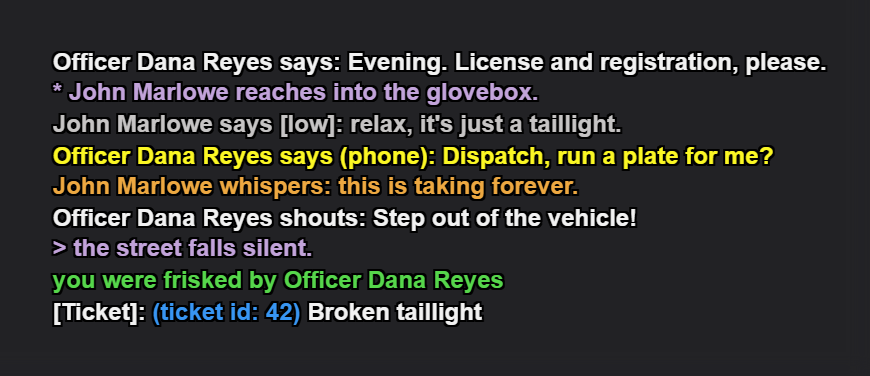
Chatlog Magician turns a raw roleplay chat log into a picture of that conversation as it looked in game. You paste the text you copied out of the chat box, and it works out what each line is, colors it the way the server does, and renders it as an image you can drop into a screenshot post, a forum thread, or a Discord channel.
It reads the generic "Name says:" format that GTA roleplay servers share, so the same paste works whether the log came from GTAW, FiveM, RAGE MP, RedM or alt:V. Server specific styling, such as GTAW faction colors, is layered on top of that once the line type is known.
Paste the log, pick a font and a background, and download a PNG. Message types are colored apart from each other, so /me, /do, /shout, /whisper, /low and /b each read at a glance rather than as a wall of identical text. You can recolor individual words or whole lines by hand when the automatic pass gets something wrong, and those choices survive re-parsing the log.
For screenshot edits. Instead of a flat background you upload the screenshot itself and place the chat over it, where it sat on screen. Blocks of chat can be moved, resized and rotated independently, image layers stack with snapping and guides, and the background takes optional blur and film grain so the overlay sits in the shot rather than on top of it.
Names, phone numbers and anything else you would rather not publish can be blurred or covered with a redaction box. Face detection runs entirely in your own browser: the model file is downloaded to your machine and the image never leaves it. Exported screenshots are only uploaded if you choose to upload one, and then to this site rather than a third party image host.
It reads the generic "Name says:" chat format shared by GTA roleplay servers, so it works with GTAW, FiveM, RAGE MP, RedM and alt:V. GTAW-specific styling such as faction colors layers on top of that.
It ran free on donations for years and they never covered the server. The tool now runs a headless render pool, hosts exported screenshots, and syncs projects and fonts, all of which cost money every month. $2 is what keeps it running and being worked on.
88 releases in the last twelve months, 107 in total. The current version is 2.4.17, released 2026-09-29. Every release is listed publicly on the changelog page.
Nothing in the tool. All three get you the same app with every feature. $5 adds your name to the supporters wall and $10 adds a Discord role. There is no feature that costs more than $2.
Everyone is welcome at discord.gg/NHke2BwRA6. On Patreon the role is added on its own once Discord is connected to your Patreon account, a one-time setup:
The role appears within a minute or two, and comes off on its own if the pledge ends. Pledged but no role? Discord is almost certainly not connected yet. Paid by card? Sign in here and press Connect Discord instead. Still stuck, email support@blancodagoat.dev.
No. Patreon is the usual way in and doubles as the sign-in, but you can also pay by card through Polar or redeem an access code. Neither needs a Patreon account.
Yes. It is a normal Patreon membership, cancelled from your own Patreon account whenever you want, with no notice period. Access lasts until the end of the period you already paid for.
No, the app itself needs a membership from $2 a month. The changelog and the translated guide pages stay free to read, and BlancoKit, the Discord toolkit on the same site, is free and has no paid tier.